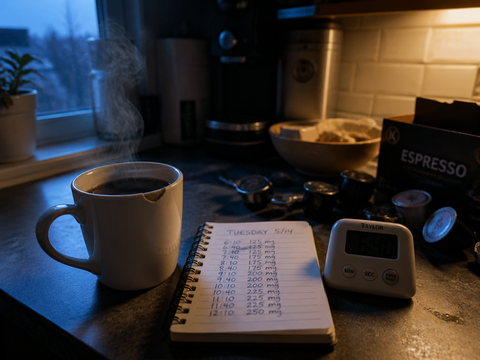
The hardest part of building your own app is no longer building it.
I know how that reads. But after nine weeks, four tools, and one genuinely stupid data loss, it's the sentence I'd defend in a bar. AI app builders took care of the part I was afraid of — the code — in under three minutes, and then handed me back the part I had never actually done: deciding, in specific terms, what the software was supposed to do. The code came free. The thinking cost me three weekends.
The verdict, in one sentence: Google AI Studio produced the only version of my caffeine-and-sleep logger that survived daily use, and it managed that only after I stopped asking it for an app and started asking it for one screen with five buttons.
What follows is what I built, what broke, what forty-one nights of my own data said, and the specific ways my method was too small to trust.
The frustration was specific, which turned out to be the whole point
I have used four caffeine-tracking apps over the past two years and abandoned all four inside a month. They fail identically. You tap a coffee cup icon, the app assumes something like 95 mg, it runs that through a five-hour half-life, and it draws you a decay curve announcing the hour at which you will be "clear."
The five-hour number is a population average laid over a range that commonly runs from about two hours to about eight, depending on liver enzyme activity, whether you smoke, what else you take. Mine is not five hours. I don't know what mine is. Finding out was the entire reason I opened the app, and none of these apps could help, because none of them ever asked the only question that would resolve it: how long did it take you to fall asleep last night?
Sleep apps ask that. Caffeine apps don't. Nothing I could find joined the two, and joining the two is a database with two columns.
So the shape of the thing I wanted was already clear before I typed a word: log the clock time and estimated milligrams of every caffeinated thing I drank, log lights-out and estimated sleep onset each morning, and put those two rows next to each other for long enough that a pattern either appeared or didn't. No curve. No prediction. A ledger.
What I asked for, and what I got instead
My first prompt, into Google AI Studio, was lazy on purpose. I wanted to see the default:
Build me an app that tracks my caffeine intake and my sleep.
First working preview: 2 minutes 51 seconds. It gave me five tabs. An onboarding flow with three welcome screens. A streak counter. A hydration reminder I had not mentioned. A settings page with a theme picker and a units toggle. A weekly bar chart of "caffeine score."
It was competent and it was useless, and the reason is worth sitting with: the model built the median app in its training data. The median app in its training data has streaks and a theme picker, because that's what shipped apps have. A streak counter is precisely backwards for this experiment — I don't want to be rewarded for logging, because a reward is a reason to fudge the entry at 11 p.m. when the number is embarrassing.
The second prompt ran to about 120 words:
One screen. No tabs, no onboarding, no streaks, no charts. Top half: five buttons I define myself, each logging a named drink with a fixed caffeine estimate in mg plus the current time. Bottom half: two time fields for last night — when I turned the light off, and when my watch says I fell asleep. Below that, a plain list of the last fourteen days, one row per day: time of last caffeine, total mg, minutes to sleep. Everything stored on the device. One button that copies the entire log to the clipboard as CSV.
Working preview: 1 minute 40 seconds. Usable version: 26 minutes, across six revisions. The revisions are the interesting part, because every one of them was something I had failed to say rather than something the tool had failed to do:
The day boundary was midnight, so an 12:40 a.m. espresso landed on the wrong day; I moved the rollover to 4 a.m. The mg presets were hardcoded and I wanted to edit them. The copy button gave no confirmation, so I pressed it four times and pasted four copies. The time pickers opened at noon instead of now. There was no way to delete a mistyped row. And the body text was 13 px, which is fine at 9 p.m. and not fine at 6:10 a.m. with one eye open.
None of that required me to know anything about code. All of it required me to have used the app for two days first. That's the actual skill these tools demand, and nobody sells it as a skill: writing a specification precise enough that a very literal builder can't misread it.

Four tools, four different failure modes
I rebuilt the same spec — the 120-word version, verbatim where possible — in four places over three evenings. Same phone (iPhone 15, iOS 26.4), same Safari, same me.
| Tool | Time to first usable build | Path to home screen | Where my data lived | What broke |
|---|---|---|---|---|
| Google AI Studio | 1 min 40 s | Share link → Add to Home Screen | Device, browser storage | Storage eviction after a quiet week |
| Claude (artifact) | ~2 min | Publish link → Add to Home Screen | Device, browser storage | Chrome-less window meant no easy reload when it hung |
| v0 by Vercel | ~9 min incl. deploy | Real URL, deployed | Device, browser storage | Overbuilt the UI twice; I spent more time deleting than adding |
| Apple Shortcuts (no AI) | ~40 min, by hand | Native widget, instant | Files app, a CSV I control | Multi-field entry is genuinely miserable to build |
A note on what that table is not measuring. All four produced something functional. None of them produced anything I'd hand to another person. And the differences that mattered turned out to be about custody and friction, not code quality.
Google AI Studio won on the narrowest, most decisive criterion: fewest steps from "I want to change one thing" to "the changed thing is on my phone." I could edit the prompt, watch the preview redraw, and refresh the home-screen icon. That loop is the product.
Claude's artifact was the fastest to a version I liked the look of — it made better typographic choices unprompted, and the 6 a.m. legibility problem never occurred there. But a published artifact opened from the home screen gave me no address bar, and when it hung once, I had no obvious way to force a reload without going back to the chat on my laptop.
v0 produced the most professional-looking result and the most work. It kept reintroducing polish I'd explicitly cut — a gradient header, an empty-state illustration, a settings drawer. Twice I asked it to remove a feature and it removed the feature and added a different one. It's a tool built for people shipping to other people, and I was shipping to one person who was already standing in the kitchen.
Apple Shortcuts is the honest control condition, and it deserves more respect than it gets. No AI, no hosting, no eviction risk, and the data lands in a CSV I own outright. It is also, for anything with more than two inputs, a genuinely unpleasant thing to build. Forty minutes of dragging blocks to arrive at something less usable than what a paragraph of English produced in ninety seconds.
Your data is a guest in someone else's house
Here is the part I'd have written first if I'd known.
On day nineteen I opened the app and the log was empty. Nine nights, gone. I had been travelling and hadn't opened it for eight days; Safari clears script-writable local storage for sites you haven't engaged with for about a week, and my little logger was, as far as the browser was concerned, an anonymous website nobody visits. That behaviour is documented, it's a reasonable privacy default, and I walked straight into it.
The fix is boring and takes four minutes: I made the CSV copy button the most prominent element on the screen, and every Sunday I press it and paste the result into a note. That's it. That's the entire backup strategy, and it has held for six weeks.
The general lesson transfers past this app. When you build a personal tool with prompt-to-app tools, you get software for free and you inherit an infrastructure problem for nothing. Nobody is maintaining this. There's no sync, no account, no support. Build the export first, before the feature you actually want. If the tool won't give you a plain-text way to get your data out in one tap, you don't have a tool, you have a demo.
Forty-one nights
I logged fifty-two nights and kept forty-one. Eleven are out: nine from the data loss, two because I'd been drinking and the sleep numbers were meaningless.
Every milligram figure below is an estimate, not a measurement. My home pourover — 17 g of a medium roast, 280 g water — I've called 175 mg. Double espresso, 120 mg. The office batch brew, 200 mg per mug, and that one is close to a guess; batch brew varies with how long it's been sitting and how heavy-handed whoever made it was. Afternoon decaf, 8 mg. Black tea, 45 mg. I have no way to assay any of it. If you want to challenge these numbers, challenge the office one first.
Sleep onset is likewise soft. I logged lights-out manually and took my watch's first-sleep estimate for the other end. Watch onset estimates are smoothed and I'd guess mine is accurate to within five or six minutes, which is fine for sorting nights into buckets and not fine for anything more precise.

| Last caffeine of the day | Nights | Median minutes to sleep | Worst night |
|---|---|---|---|
| Before 1 p.m. | 14 | 12 | 24 |
| 1–3 p.m. | 15 | 19 | 41 |
| After 3 p.m. | 12 | 34 | 68 |
Two things I did not expect.
Total daily milligrams told me almost nothing. My intake ranged from 120 mg to 420 mg across those forty-one days, and sorting by total produced no clean gradient at all. A 400 mg day that finished at 11 a.m. put me down in eleven minutes. A 190 mg day with the last cup at 4:30 p.m. cost me fifty. If there's a single actionable number in my log, it's a clock time, not a dose.
Decaf after dinner is fine, for me. I had assumed the 8 mg was doing something, or that the ritual of a hot drink at 9 p.m. was. Across six decaf nights the median onset was 13 minutes, indistinguishable from my caffeine-free nights. That theory is dead and I'm pleased, because I like the ritual.
And the confound I can't remove: the days I drank coffee after 3 p.m. were, nearly without exception, the days I was working late. Later dinner, later screen, later brain. I have no way to separate the caffeine from the circumstances that produced it, and forty-one nights is nowhere near enough to try. What I actually learned is narrower and more useful than a mechanism: when my last cup lands after 3 p.m., my nights go badly, whatever the reason. I moved my cutoff to 1 p.m. and stopped needing to know why.
What I couldn't test
I'm on iPhone, so everything above about home-screen behaviour and storage eviction is an iOS story; Android's browser storage rules differ and I have no data there. I didn't try Replit Agent, Bolt, or Lovable, all of which people whose judgement I trust prefer to the ones I used. I ran no control period — no stretch of deliberately random caffeine timing — because I wasn't willing to wreck two weeks of sleep for a cleaner dataset. And I can't rule out that the improvement came from paying attention rather than from the app; measuring a habit is the oldest way to change it. One person, forty-one nights, self-reported inputs and a smoothed watch estimate. Treat all of it as a case study, which is what it is.
Who this is for, and who should close the tab
This is for you if you can describe, in a paragraph, a tool you've wanted and failed to find — and if what you want is genuinely small. One screen. Two or three inputs. Data that only matters to you. Habit ledgers, a shot-log for your espresso grinder, a reading tracker with your categories rather than Goodreads', a wind-down checklist with your six items. These builders are excellent at exactly this size, and the smaller your idea, the better the result.
This is not for you if you want something with an account, sync between two devices, notifications you can rely on, or another human being using it. Every one of those crosses out of "one screen a model can generate" and into "software with a backend," and at that point you are not saving yourself work, you are acquiring an unpaid maintenance job. It's also not for you if you don't yet know what you want. The tools will happily build the vague version, and the vague version is the one with the streak counter.
And if your honest reaction to "the browser deleted my data" was I would never have recovered from that — stay with a paper notebook or a spreadsheet. That's not a lesser answer. For nine of my forty-one nights, a notebook would have outperformed the app.
The winner
If you want one working thing on your home screen tonight: use Google AI Studio, ask for a single screen instead of an app, and make the export button the first feature you request — not the last.
The order matters more than the tool. Any of the four would have got me a logger. Only the export discipline got me a dataset.
Try this, this week
Don't build anything yet.
For the next seven days, write two lines in your notes app each morning. First: the clock time of your last caffeinated drink yesterday. Second: the time you turned the light off, and your best guess at when you fell asleep. Nothing else — not the dose, not the roast, not how you felt.
Seven days won't prove anything, and it isn't meant to. It's meant to show you which fields you actually reach for and which ones you invented because they sounded rigorous. I thought I needed milligrams. It turned out I needed a clock time.
Then, in week two, spend three minutes describing that — the two fields you kept, and nothing more — to an AI app builder. You'll get something worth putting on your home screen, because by then you'll know what to ask for.